
CoreSpeed Tier Calculator
Optimize your hosting costs without compromising on speed. Share a few details about your current setup, and we’ll calculate the most cost-effective tier that delivers premium WordPress performance and guarantees Good Web Vitals.
Recommended Hosting Tier
Recommendation Factors
All Tiers Comparison
| Tier | Storage | Traffic | Monthly |
|---|
Custom Solution Recommended
Why a Custom Solution?
Get a personalized hosting recommendation from our WordPress performance team.
Note: CoreSpeed Tier 1 is included in our SiteCare Gold and Diamond plans. CoreSpeed can’t be purchased without a SiteCare plan.
How to Use This Calculator
1. Enter your estimated monthly traffic. Enter the total number of page views or visits your website receives each month. You can find this data in your analytics platform (Google Analytics, etc.).
Sites with consistent traffic patterns will get more accurate recommendations. If your traffic varies seasonally, consider using your peak month to ensure adequate capacity during high-demand periods.
2. Enter your total storage needed. This is the combined size of your database and all files, including media uploads, themes, and plugins. Your current hosting provider can tell you how much storage you’re currently using. You can also find this information in the Info tab of the Site Health section in WordPress.
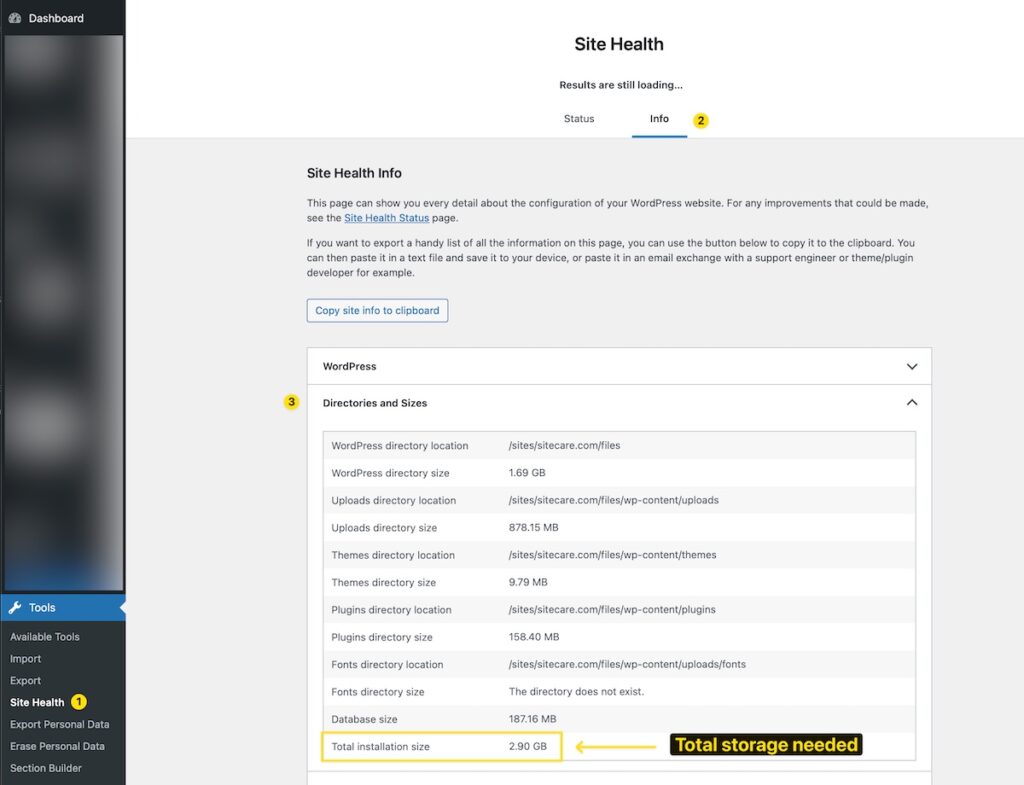
When estimating storage, account for future growth, especially if you regularly publish content with images or videos.
Important note: The Total installation size doesn’t account for “offloaded media”. If you see plugins like WP Offload Media, Infinite Uploads, Advanced Media Offloader, or similar installed on your website, further evaluation may be needed.
3. Indicate whether your site has WooCommerce or dynamic functionality. Select “Yes” if your site includes eCommerce, membership areas, learning management systems, forums, or any feature that requires users to log in and interact with personalized content.
Dynamic sites require more server resources than static brochure-style websites because they generate unique content for each visitor rather than serving cached pages.
4. Indicate whether you’re running WordPress Multisite. A WordPress Multisite network allows multiple separate sites to be managed from a single WordPress installation. This is common for organizations managing multiple brand sites, franchise networks, or educational institutions.
If you select “Yes,” you’ll be asked to enter the number of sites in your network. Include all sites, including the main site.
How to Read Your Calculator Results
Recommended Tier: The hosting tier that best matches your requirements based on the information you provided. Tiers range from Tier 1 (for smaller sites) to Tier 5 (for high-traffic sites with substantial storage needs).
Storage Included: The amount of disk space included with your recommended tier. This covers your WordPress files, media library, database, and backups.
Traffic Capacity: The range of monthly visits your recommended tier is optimized to handle. Your tier is designed to maintain fast performance throughout this traffic range.
Monthly/Annual Pricing: The cost for your recommended tier. Annual pricing reflects a discount compared to paying month-to-month.
Recommendation Factors: A breakdown of how we arrived at your recommendation. This shows how your traffic, storage, and site complexity each influenced the final tier suggestion. If your tier was upgraded due to WooCommerce or Multisite requirements, you’ll see that explained here.
All Tiers Comparison: A table showing all available tiers with their storage, traffic capacity, and pricing. Your recommended tier is highlighted, making it easy to see how it compares to other options if your needs change.
When You’ll Need a Custom Solution
If your requirements exceed our standard tier offerings, the calculator will recommend booking a call with our WordPress performance experts. This happens when:
- Your monthly traffic exceeds 1.5 million visits
- Your storage needs exceed 200 GB
- Your Multisite network includes more than 25 sites
In these cases, our team will work with you to design a custom hosting solution tailored to your specific performance and scalability requirements.