

IN THIS ARTICLE

A quick introduction to INP
Google’s Core Web Vitals have reshaped how websites are evaluated for user experience, and a new metric, Interaction to Next Paint (INP), is quickly becoming one of the most important to monitor. INP measures how quickly your site responds to user interactions—clicks, taps, or keystrokes. For food publishers, who depend on highly interactive features like “Jump to Recipe” buttons or recipe indexes, it’s critical to understand and fix INP.
But here’s the thing: INP isn’t just another box to tick. It reflects how responsive and seamless your site feels for users. And while improving it can be technically challenging, the rewards are clear: better user engagement, stronger search rankings, and happier visitors.
At SiteCare, we’ve developed a proven set of techniques to help publishers like you tackle INP head-on. This isn’t about quick fixes—it’s about delivering long-term solutions tailored to your site’s unique needs. Here’s how we do it.
Why INP matters for food publishers
Food publishing is a unique niche. Readers come to your site looking for quick, actionable content: a recipe they can make tonight, a printable list of ingredients, or inspiration for their next dinner party. If your site is slow to respond—if the “Print Recipe” button lags or the “Jump to Recipe” link takes too long to load—they’ll likely bounce and look elsewhere.
That’s where Interaction to Next Paint (INP) comes in. INP measures how long it takes for your site to respond to user interactions. Specifically, Google looks at the slowest interaction during the 75th percentile of all interactions on your site. A good score is under 200 milliseconds. Anything higher suggests a sluggish experience that could frustrate users and hurt your SEO rankings.
The challenge for food publishers? Ads. Most publishers work with providers like Raptive or Mediavine, whose third-party ad scripts can significantly impact INP. We have data to show the how ad scripts can negatively impact INP. Raptive’s documentation acknowledges their scripts contribution to higher INP scores as well. While these ads are critical for revenue, they can also be a major source of delays in user interactions if not implemented with a deft hand.
This is where SiteCare’s expertise comes into play. We’ve spent years working with publishers to optimize performance, improve responsiveness, and ensure ads coexist harmoniously with a great user experience.
Measuring INP: Why lab tools aren’t enough
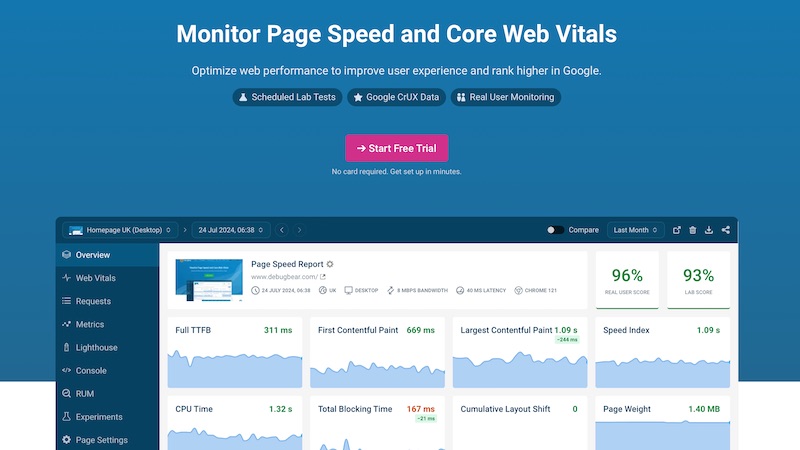
Unlike other Core Web Vitals metrics like LCP or CLS, INP can’t be accurately measured in a lab. It requires real-world data, which Google collects through the Chrome User Experience Report (CrUX) and tools like Google Search Console.
For deeper insights, we use Real User Monitoring (RUM) tools like DebugBear. DebugBear provides granular data on how users interact with your site, highlighting specific elements or scripts causing delays. For example, it might reveal that your “Jump to Recipe” button is slowed by a third-party ad script—or that your comment section is impacting interaction times.
But we don’t stop there. At SiteCare, we’ve developed custom JavaScript leveraging Google’s Web Vitals guidance. This script tracks and logs real-world interaction delays directly to Google Analytics, giving us an unprecedented level of detail about what’s impacting your INP scores. It’s this level of precision that sets us apart from competitors who rely solely on generic tools.
Case study: Improving INP for a homestyle cooking site
One of our clients—a popular destination for easy and delicious homestyle cooking—came to us with a challenge: poor INP scores on both desktop and mobile, driven by heavy interactive elements and third-party ad scripts. They wanted to improve website responsiveness without sacrificing the features and ads that supported (and continue to support) their site.
Through a combination of technical optimizations, collaboration with their ad provider, and ongoing monitoring, we helped them achieve remarkable improvements in just a few months.
Why optimizing for INP takes time
Improving INP isn’t an instant fix—it’s a careful process that relies on real-world user data to identify specific performance bottlenecks. This means that we need to monitor actual interactions over time to identify specific elements causing delays.
Every site is unique, so our solutions are always tailored to address factors like site structure, interactive elements, and third-party integrations. This requires testing, validation, and iterative refinements to make changes improve performance without disrupting functionality.
Additionally, collaborating with third-party providers, like Raptive or Mediavine, to adjust ad configurations can take time as well.
The optimization results
After implementing our recommendations, the site achieved the following:
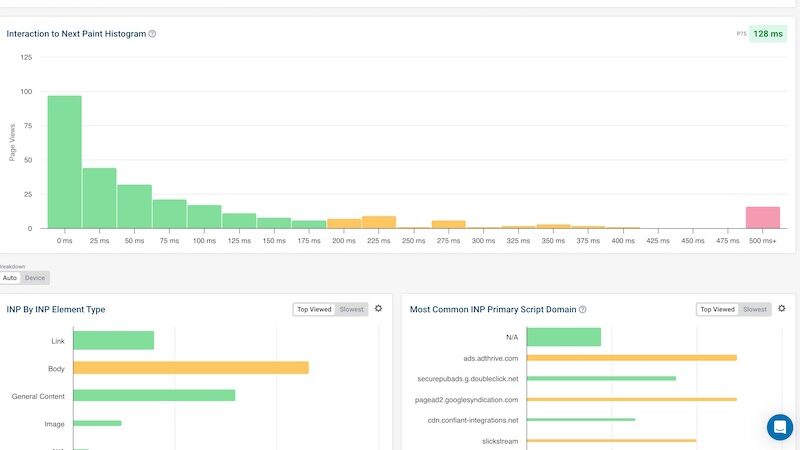
- INP reduced from 350ms to 128ms on desktop and 142ms on mobile.
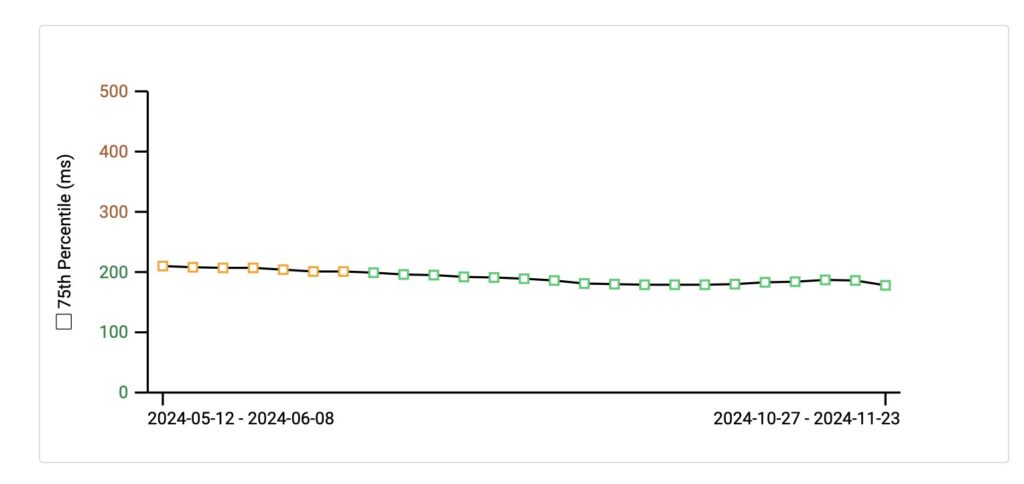
- 75th percentile INP score consistently below Google’s target of 200ms
- Improved interaction times for critical features like the “Jump to Recipe” button and “Print” buttons, reducing user frustration and bounce rates.
Here’s a snapshot of the site’s progress, as shown by Google and independent monitoring tools:
The steps we took: A technical breakdown
Optimized interactive features
❌ Issue
The “Jump to Recipe” button had high interaction delays due to scripts being loaded asynchronously and competing for browser resources.
✅ Solution
We restructured the button’s JavaScript to ensure it was loaded and executed as a top priority. This involved:
- Preloading critical JavaScript resources required for the button.
- Delaying non-critical JavaScript to ensure the button’s scripts were executed first.
- Testing with DebugBear to confirm the interaction time was consistently under 100ms.
Implemented “Load More Comments”
❌ Issue
The site’s comment section loaded thousands of comments by default, significantly increasing page load time and delaying interactions.
✅ Solution
We implemented a lazy-loading “Load More Comments” button, ensuring:
- A smaller number of comments load initially, reducing page weight and reducing AJAX requests, which can be heavy.
- Additional comments load on demand, keeping interactions responsive.
Streamlined third-party scripts
❌ Issue
Slickstream’s script was reloading unnecessarily, causing repeated DOM manipulations.
✅ Solution
We restructured the site’s HTML to allow Slickstream to load once without reinserting itself. This involved:
- Auditing the Slickstream implementation to identify redundant calls.
- Modifying the page structure to reduce unnecessary DOM interactions.
Enhanced image handling
❌ Issue
The first image in each post was conflicting with lazy loading and the decoding attribute, causing delays.
✅ Solution:
- Removed the
decodingattribute from the first image to avoid conflicts. - Added a minimum image height for the first image to prevent layout shifts.
- Enabled Cloudflare Polish to serve images in next-gen formats (WebP) for faster delivery.
Implemented Cloudflare APO
❌ Issue
Dynamic page generation caused delays in delivering pages to users, particularly for those in remote regions.
✅ Solution:
- Enabled Cloudflare Automatic Platform Optimization (APO) to cache WordPress content at Cloudflare’s edge servers.
- Configured APO to reduce the time it takes to serve pages by delivering cached assets directly to users.
- Verified improvements in time-to-interaction for all regions using DebugBear.
Refined WP Rocket settings
❌ Issue
The site wasn’t fully leveraging WP Rocket’s optimization capabilities.
✅ Solution
- Enabled JavaScript delayed loading, deferring non-essential scripts.
- Used WP Rocket’s “Delay JavaScript Execution” feature with carefully crafted exclusions for only the scripts that were necessary on initial page load.
- Optimized CSS delivery by removing unused CSS and reducing file sizes.
Custom interaction tracking
❌ Issue
The client needed better visibility into what specific interactions were causing high INP scores.
✅ Solution
- Developed a custom JavaScript solution based on Google’s Web Vitals guidelines to track and log high-INP interactions directly to Google Analytics.
- Configured the script to attribute delays to specific elements, such as ads, images, or interactive buttons.
- Used this data to continuously refine and improve the site’s performance.
What happened after we improved INP for the site?
While the primary goal of improving INP is to enhance user experience and meet Google’s performance standards, the benefits extend beyond better Core Web Vitals scores. For this client, the technical improvements we implemented not only made their site faster and more responsive but also led to measurable business growth.
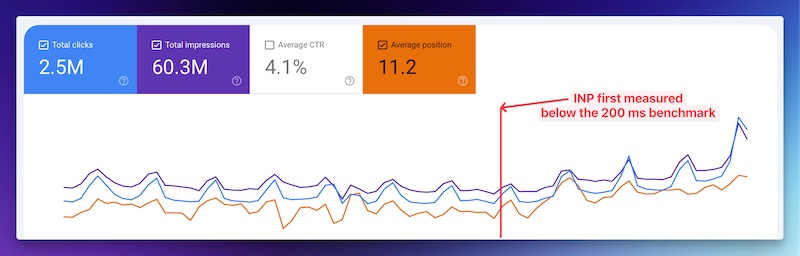
By improving the site’s responsiveness and reducing user frustration, the client experienced a 19% increase in total traffic compared to the same period in the previous year. This growth was driven by:
- Higher search rankings: The improved INP scores contributed to better visibility in Google search results, particularly for competitive recipe-related keywords.
- Improved user engagement: Faster interaction times kept readers on the site longer, increasing exploration of additional pages and interacting with ads.
- Stronger ad performance: With more traffic and higher engagement, ad impressions and click-through rates improved, leading to a 22% boost in ad revenue year over year.
We saw noticeable improvements immediately after the INP improvements were validated by Google.
This case demonstrates how technical improvements to site performance can directly impact a publisher’s bottom line.
Ads and INP: A collaborative approach
Ads are a necessary part of food publishing, but they’re also a common culprit behind poor INP scores. Because most publishers rely on providers like Raptive or Mediavine to manage their ads, addressing these issues requires experienced collaboration.
At SiteCare, we work closely with ad providers, using DebugBear, Search Console, and Google Analytics data to highlight problem areas. For example:
- We’ve worked with providers to enable lazy loading for ads, ensuring they only load when they’re visible.
- We’ve advised on removing specific ads that have a high negative impact on INP and low earning potential.
- We’ve collaborated on deferring non-critical ad scripts, reducing their impact on interaction times.
- We’ve identified high-impact ad placements that conflicted with user interactions, helping providers adjust their configurations.
This approach ensures that publishers can maintain revenue while improving site performance.
Why SiteCare goes the extra mile
Improving INP isn’t just about completing technical tasks. It’s about understanding the specific needs of food publishers and delivering customized solutions that work.
Our custom JavaScript for tracking high-INP interactions is just one example of how we go above and beyond. By logging real-world delays to Google Analytics, we provide unparalleled visibility into what’s really happening on your site. This level of detail allows us to make precise, data-driven improvements that our competitors can’t offer.
Sustaining long-term improvements
Once INP improvements are made, it’s crucial to monitor performance over time. Even small changes like adding a new plugin, changing image formats, or adjusting ad placements can impact responsiveness. That’s why we offer ongoing performance monitoring and RUM testing through our SiteCare plans to ensure your site stays fast.
If your site is struggling with responsiveness or rankings, let us help. Contact us today to learn how we can optimize your site for better INP and a better experience for your readers. For publishers who also need reliable WordPress support & maintenance, our team provides tailored solutions to keep your site secure, optimized, and running smoothly.




Leave a Reply